Specifying Your Own Distribution
Source:vignettes/specify-user-defined.Rmd
specify-user-defined.RmdThis vignette explains how to create user-defined distributions using
distionary.
User-Defined Distributions
You can make your own distribution using the
distribution() function. Specify distribution properties as
name-value pairs, where the name is the distribution property.
Distributional representations like the cumulative distribution
function (CDF) can be specified as functions.
my_normal <- distribution(
  density = stats::dnorm,
  cdf = stats::pnorm,
  g = 9.81,
  another_representation = function(x) x^2,
  .support = continuous(c(-Inf, Inf))
)
# Inspect
my_normal
#> Unnamed distribution (continuous)
#> --Parameters--
#> NULL
The usual evaluation framework can now be accessed, such as evaluating the CDF.
Even though the mean has not been specified, it can still be evaluated.
mean(my_normal)
#> [1] 0
Some of the specified properties are special because they correspond
to a property that’s known to distionary – in this example,
density and cdf. (The distribution’s support,
and hence its range, comes from the .support argument
described below.) In general, the special names can be identified as
follows:
- The suffix following
eval_for any distributional representation (e.g.,quantileforeval_quantile()). These should be specified as functions. -
realiseorrealize, which is used to generate random samples from the distribution. This should be a function of the number of observations to draw. - The same name as the
distionaryfunctions used to extract any other property (e.g.,meanformean()).
See the Evaluate
a Distribution vignette for more details on these evaluation
functions and the network of relationships between the understood
properties. Note that, in the current version, specifying a
cdf along with a density or pmf
(probability mass function) is required for evaluating non-explicit
properties.
That requirement is less arbitrary than it looks. Some properties
carry the whole distribution: hand distionary a
CDF and nothing has been lost, so everything else can be worked out from
it. A property that does this is called a
representation. Others keep only a piece. A mean of 1.5
is true of endlessly many distributions, and there is no route back from
it to the one you meant.
Being a representation is a role a property plays, not a separate
kind of thing. cdf is a property of a distribution and also
a representation of it; mean is a property and nothing
more. The network shown below is really a map of which properties keep
enough to reach the others — which is why its arrows leave the
representations, and why a distribution described only by its mean can
tell you so little.
In general, properties can be invoked by the more general function
eval_property(), which is useful for accessing entries that
are not known to distionary. For example, the user-defined
property g can be accessed in this way.
eval_property(my_normal, "g")
#> [1] 9.81
To use eval_property() to evaluate a function, arguments
can be specified in the ... argument.
eval_property(my_normal, "another_representation", 1:4)
#> [1]  1  4  9 16
The eval_property() function is also useful for
programmatically accessing distribution properties.
properties <- c("mean", "variance")
lapply(properties, function(x) eval_property(my_normal, x))
#> [[1]]
#> [1] 0
#>
#> [[2]]
#> [1] 1
Distribution Attributes
Distribution metadata are stored as attributes, and are those
arguments prefixed by . in the distribution()
function.
-
.support, as seen in the example starting this vignette, specifies the distribution’s support – the set on which it places probability – usingcontinuous(),discrete(), ormixed(). Every distribution needs one; the variable type (continuous, discrete, or mixed) and the range are derived from it. (The older.vtypeargument, which took a string such as"continuous", is defunct: a type does not say where the probability is, so it cannot stand in for a support. See the The Support of a Distribution vignette.) -
.nameallows you to give the distribution a name. -
.parametersallows you to specify values for the distribution’s parameters as a list, if applicable. This version ofdistionarydoes not draw from these values, so it currently serves a similar function as the distribution’s name.
my_distribution <- distribution(
  cdf = pnorm,
  density = dnorm,
  .support = continuous(c(-Inf, Inf)),
  .name = "Special",
  .parameters = list(theta = 1.7, mat = diag(2), hello = "hi")
)
# Inspect
my_distribution
#> Special distribution (continuous)
#> --Parameters--
#> $theta
#> [1] 1.7
#>
#> $mat
#>      [,1] [,2]
#> [1,]    1    0
#> [2,]    0    1
#>
#> $hello
#> [1] "hi"
Retrieve the support, and the variable type derived from it:
support(my_distribution)
#> <support: continuous>
#> -- continuous --
#> [-Inf, Inf]
vtype(my_distribution)
#> [1] "continuous"
Retrieve the parameters:
parameters(my_distribution)
#> $theta
#> [1] 1.7
#>
#> $mat
#>      [,1] [,2]
#> [1,]    1    0
#> [2,]    0    1
#>
#> $hello
#> [1] "hi"
You can also reset the parameters with <-. Lets give
this distribution scalar parameters.
parameters(my_distribution)[["mat"]] <- 1
parameters(my_distribution)[["hello"]] <- NULL
# Inspect the distribution
my_distribution
#> Special distribution (continuous)
#> --Parameters--
#> theta   mat
#>   1.7   1.0
Retrieve the distribution’s name with pretty_name().
pretty_name(my_distribution)
#> [1] "Special"
Names are “pretty” because they can also include the parameters in a compact way, when the parameters are scalars (which they now are):
pretty_name(my_distribution, param_digits = 2)
#> [1] "Special(1.7, 1)"
Example of a New Parametric Family
If you want to create your own parametric family, such as a
distribution whose density decays linearly from x=0 to
x=a, you can do this by making a function that accepts the
distribution parameter as an input, and outputs the distribution. Note
that the CDF and density are specified, as required for continuous
distributions, the support is given with
.support = continuous(c(0, a)), and other metadata are
specified with the arguments starting with ..
dst_linear <- function(a) {
  # It helps to check that the parameter is valid.
  checkmate::assert_number(a, lower = 0)
  # We'll create some representations outside of the `distribution()`
  # call for separation of concerns. Note that care is taken to ensure
  # proper behaviour outside of the range of the distribution.
  density <- function(x) {
    d <- 2 / a^2 * (a - x)
    d[x < 0 | x > a] <- 0
    d
  }
  cdf <- function(x) {
    p <- x / a^2 * (2 * a - x)
    p[x < 0] <- 0
    p[x > a] <- 1
    p
  }
  # Create the distribution.
  distribution(
    density = density,
    cdf = cdf,
    .support = continuous(c(0, a)),
    .name = "Linear",
    .parameters = list(a = a)
  )
}
Notice how the distribution metadata gets printed with the distribution.
dst_linear(3)
#> Linear distribution (continuous)
#> --Parameters--
#> a
#> 3
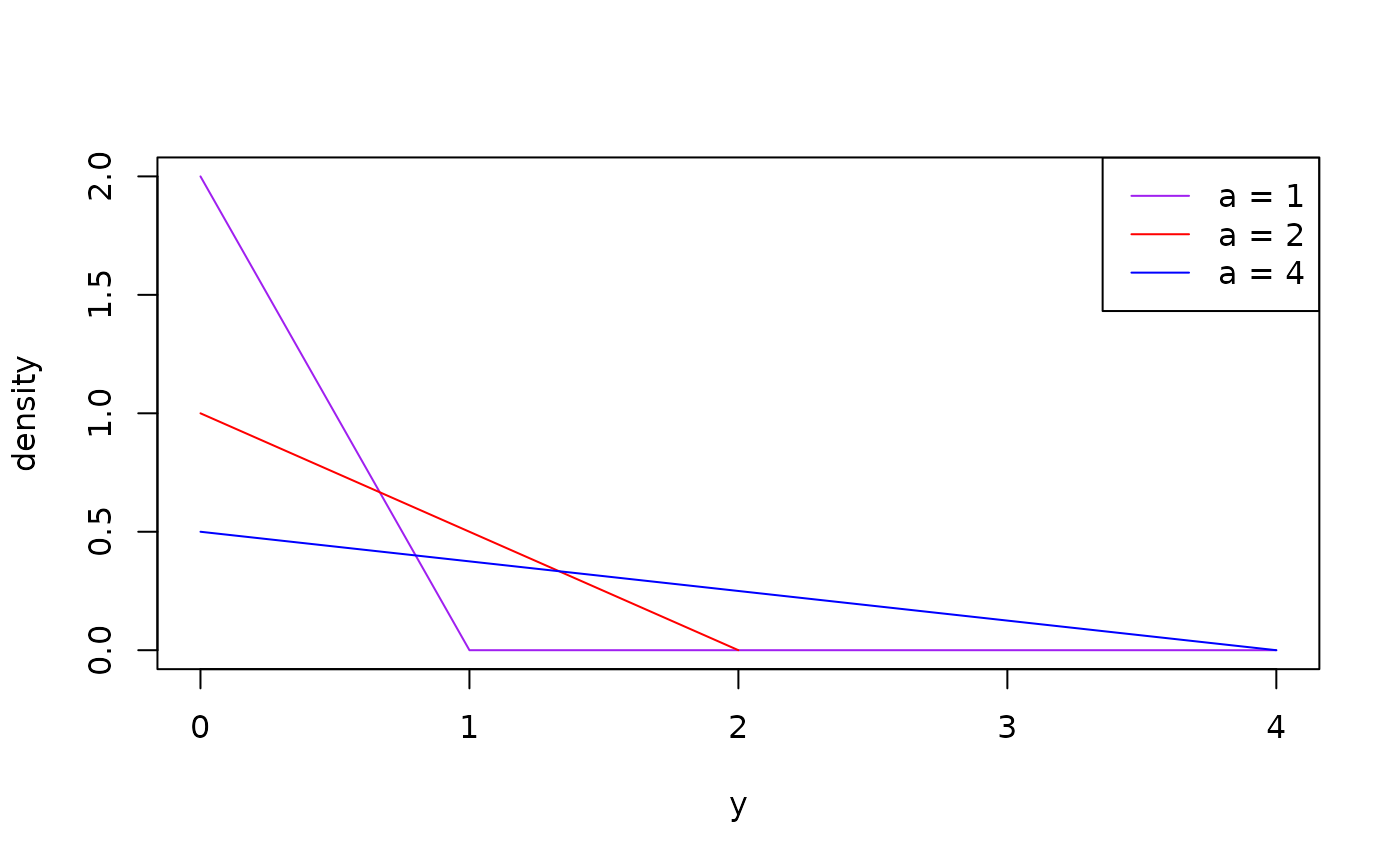
Here are the density plots of different members of this family.
plot(dst_linear(1), to = 4, col = "purple")
plot(dst_linear(2), add = TRUE, col = "red")
plot(dst_linear(4), add = TRUE, col = "blue")
legend(
  "topright",
  legend = c("a = 1", "a = 2", "a = 4"),
  col = c("purple", "red", "blue"),
  lty = 1
)
As usual, properties can be evaluated, even if they are not specified. Consider, for example, calculating return periods of three different Linear distributions.
enframe_return(
  model1 = dst_linear(1),
  model2 = dst_linear(2),
  model3 = dst_linear(4),
  at = c(2, 5, 10, 20, 50, 100),
  arg_name = "return_period"
)
#> # A tibble: 6 × 4
#>   return_period return_model1 return_model2 return_model3
#>           <dbl>         <dbl>         <dbl>         <dbl>
#> 1             2         0.293         0.586          1.17
#> 2             5         0.553         1.11           2.21
#> 3            10         0.684         1.37           2.74
#> 4            20         0.776         1.55           3.11
#> 5            50         0.859         1.72           3.43
#> 6           100         0.900         1.80           3.60
Network of Properties
The key innovation in distionary is its network-based
approach to probability distributions. Different distributional
representations (CDF, PDF/PMF, quantile function, survival function,
etc.) are interconnected through a network of mathematical
relationships.
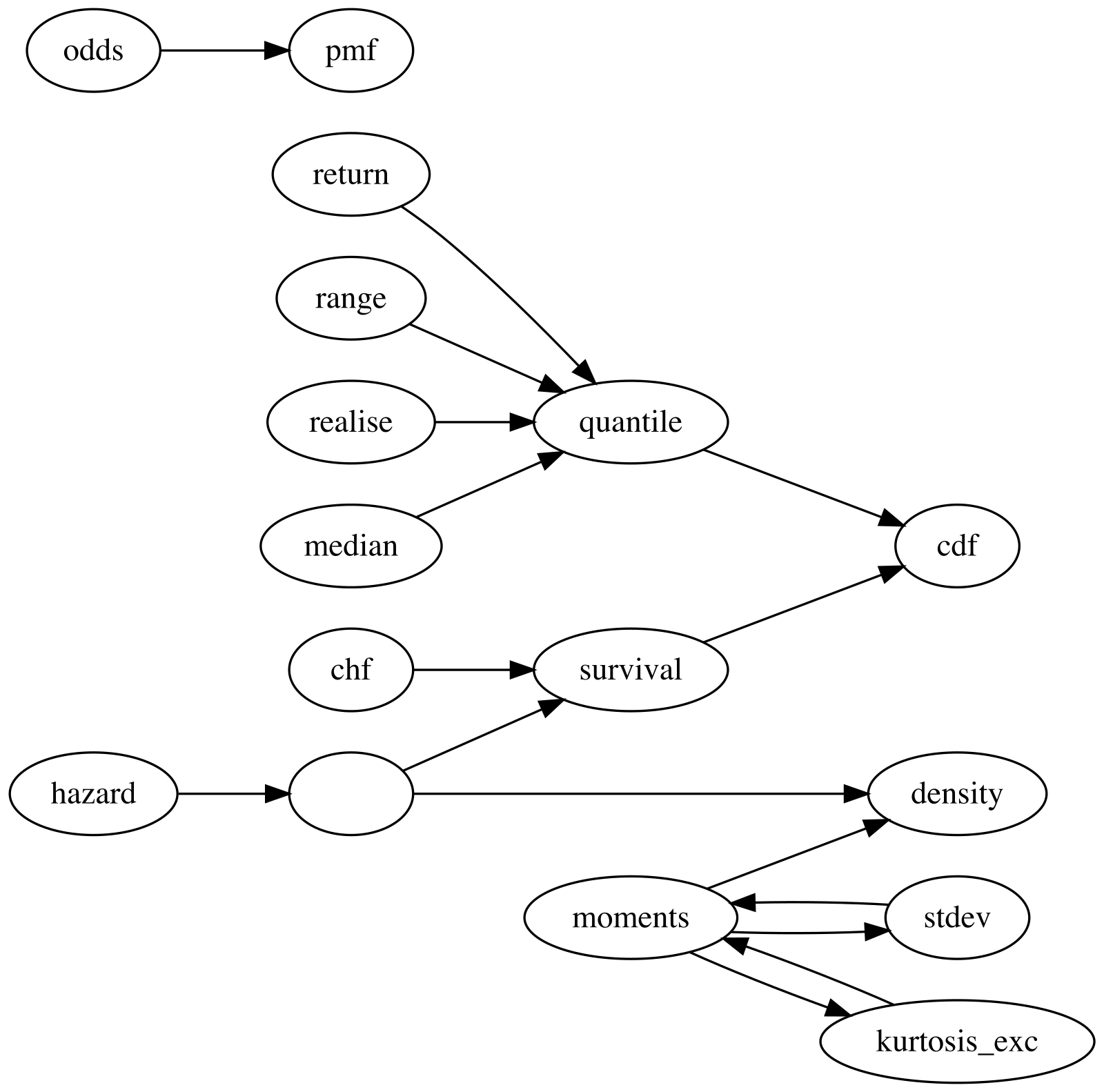
The diagram below shows how distionary derives
distribution properties from other properties. An arrow from one
property to another indicates that the first property can be calculated
from the second. For example, quantile can be calculated
from cdf, and mean can be calculated from
density. This network structure is what allows you to
define a custom distribution with just one or two representations (like
cdf and density in the example above) and
still have access to all other properties.
Making your own properties
Some properties are easy to make yourself. Here is an example of a function that calculates interquartile range.
# Make a function that takes a distribution as input, and returns the
# interquartile range.
iqr <- function(distribution) {
  diff(eval_quantile(distribution, at = c(0.25, 0.75)))
}
Apply the function to a Linear distribution as defined before.
iqr(dst_linear(2))
#> [1] 0.7320508
For properties that are not handled by distionary (e.g.,
extreme value index, or moment generating function), one option is to
build these properties into your own distribution. A future version of
distionary will make user-defined properties easier to work
with.
Limitations
The distionary package is still young. Lots of helpful
features are still missing, and your patience is appreciated as more
features are developed. Some examples follow.
| # | Limitation | Explanation |
|---|---|---|
| 1. | Numerically computed moments of a distribution with infinitely many
atoms rely on the tail contributing negligibly, and return
NaN if that never happens. |
The atoms are summed by walking outward through the support (via the
discretes package). The walk stops only once the
probability still ahead of it has been spent, which the CDF says
exactly, and the atoms underfoot are contributing negligibly.
The first is a real bound; the second is a reading of what has just been
passed, and a distribution whose contributions vanish while its
probability does not — a heavy tail — cannot be settled either way, so
it returns NaN. |
| 2. | Representations are not checked for accuracy in this version. | While this is done in the test suite for the built-in distributions,
additional levels of detail are required when accepting a foreign
distribution. One consequence is worth knowing: a numerical moment over
atoms uses the CDF to tell how much probability is still ahead of it, so
a CDF that disagrees with the PMF can leave the sum unable to settle,
and it returns NaN. |
| 3. | Typos when specifying distribution property names
(e.g. densty instead of density) or variable
type (e.g., "contnous" instead of
"continuous") will not trigger an error. |
The package does not assume that distribution properties and types are limited, allowing for flexibility. |
| 4. | It is currently assumed that the distributional representations are specified in a way that remains valid beyond the range of the distribution. | A future version aims to use the specified range to automatically implement appropriate behavior. |